





Free template for repair businesses
Repair estimate template: download it free as PDF or Word.
One printable page for every repair estimate, from the diagnosis and line items to your customer's decision.
No sign-up, no email address.
What goes into a repair estimate?
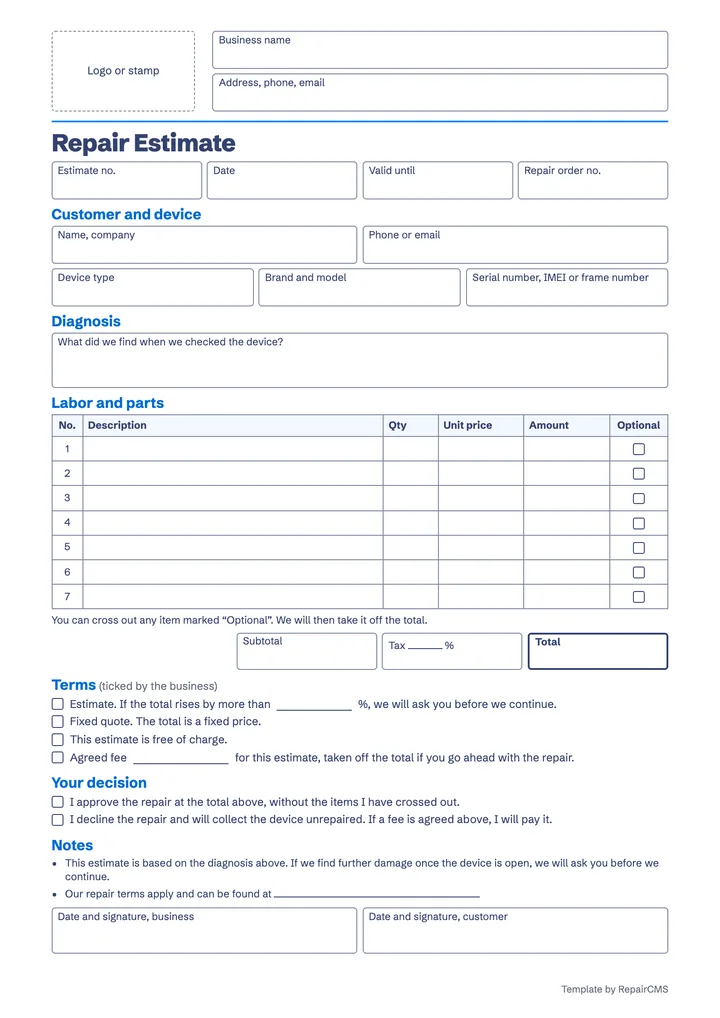
A repair estimate lists the device, your diagnosis, every labor item and replacement part with its price, the total and the terms it's based on. Your customer's decision goes on it too, so it's on paper whether you go ahead with the repair.
| Field in the template | Why it matters |
|---|---|
| Estimate no. and date | With both, you find the estimate again when your customer calls days later. |
| Valid until | Parts prices change. The date tells your customer how long your price holds. |
| Repair order no. | The order number links the estimate to the device on your shelf and to the repair order. |
| Customer | A phone number or email address lets you reach your customer as soon as the estimate is ready. |
| Device and serial number | Device type, brand and model say what it's about. The serial number, the IMEI or, on an e-bike, the frame number identify the exact device. |
| Diagnosis | In plain words, what you found when you checked the device. That way your customer understands what they're paying for. |
| Labor and parts | Seven lines with quantity, unit price and amount. Labor time and each replacement part get a line of their own. |
| Optional | You tick items your customer can do without, for example a new screen protector or cleaning the grinder. If they don't want them, they cross them out and you take them off the total. |
| Subtotal, tax and total | You enter the tax rate yourself, whether that's sales tax or VAT, and no field carries a currency symbol. So the sheet fits your business in any country. |
| Terms | You tick whether this is an estimate, where the price may change, or a quote with a fixed price. For an estimate, you enter the percentage above which you ask your customer before you carry on. |
| Free of charge or agreed fee | If you charge for checking the device, you enter the amount. If your customer goes ahead with the repair, you take it off the total. If they decline, they pay the fee. |
| Your decision | Your customer ticks whether they approve the repair or decline it and collect the device unrepaired. |
| Notes | Sample wording tells your customer that you'll ask first if you find more damage once the device is open, and points to your repair terms. Check both and adapt them to your business. |
| Two signatures | You sign for your business, and your customer signs their decision. You keep a copy. |
Every field is ready in the template, and page 2 has short instructions.
Which repair estimate mistakes cost you money later?
Any estimate can cost you money later if nobody can tell afterwards what was agreed. You close these six gaps while you fill it in.
The fee is only in your small print
Whether and how you may charge for an estimate depends on where you work. To be safe, agree on the fee when your customer drops off the device and have them sign it before you open anything. In California, for example, electronics and appliance repair dealers must tell the customer the diagnosis fee and get their approval first.
Nobody knows if it's an estimate or a quote
In the UK, Citizens Advice describes a quote as a fixed price for the work and an estimate as your best guess at the cost. Tick which one applies on the sheet, so your customer knows where they stand.
The diagnosis is too short
“Pump faulty” tells your customer very little. Write down what you found and what follows from it, for example “Pump leaking, water inside the housing, circuit board dry”.
Everything is on one line
A single total quickly raises the question of what it's all for. Enter labor time and each replacement part as separate items. Then your customer sees what they're paying for and can cross out optional items.
Extra costs only show up on the invoice
If you find more damage once the device is open, tell your customer right away and not when they collect it. In California, for example, electronics and appliance repair dealers may not charge more than the written estimate without the customer's prior consent. With the percentage on the sheet, your customer knows in advance when you'll call.
The customer's answer is missing
A quick “yes, go ahead” on the phone is easily forgotten. Have your customer tick on the sheet whether they approve or decline, and sign it. When they drop off the device before that, use our repair order template.
When does a paper estimate reach its limits?
Paper reaches its limits as soon as your customer isn't there. Then you photograph the sheet, email it and wait for a call back while the device lies open on your bench. If they cross out an item on the phone, you work out the total again, and for the invoice you type the items in once more. As long as your customers decide when they drop off or collect their device, the template does the job well.
How does a repair estimate work in RepairCMS?
With the repair quoting software in RepairCMS, you create the estimate right on the repair order and mark items your customer can skip as optional. Your customer gets an email and opens the estimate in the customer portal. There they deselect optional items, approve or decline, and download it as a PDF if they need one. Once they approve, the status in RepairCMS changes straight away and the invoice is created automatically. If you've switched on online payment with Ultimate FastPAY, they can pay right after approving. For declined estimates, you can set a fee.
If the sheet is enough for you, stick with it. If you'd like to see how your customer approves an estimate in the portal, take a look at the workflow in RepairCMS.
Frequently asked questions about the repair estimate template
Is the repair estimate template really free?
Yes. You download it as a PDF or Word file with no sign-up and no email address, and use it in your business as often as you like. It works for smartphones, computers and other electronics, bikes and e-bikes, watches, coffee machines and sewing machines. You can read more about each trade on our page about repair business software.
Can I fill in the template on my computer?
Yes, with the Word version. Enter your business details and the line items there, and replace the “Logo or stamp” box with your logo. The Word file is set to A4, and you can switch it to US Letter. The PDF version is made for printing. Give page 1 to your customer to tick and sign, and keep a copy for yourself. Page 2 explains the template in four steps.
Can I charge for a repair estimate?
In most places, yes, as long as you agree on the fee with your customer beforehand, whether you call it a diagnostic fee or a bench fee. Tell your customer the amount before you check the device and have them sign it. In California, for example, electronics and appliance repair dealers must tell the customer the diagnosis fee and get their approval first (16 CCR § 2722.6). In the UK, what you tell a consumer about your service before they agree can become part of the contract (Consumer Rights Act 2015, s. 50). On the template, you tick the agreed fee and take it off the total if your customer goes ahead with the repair.
What's the difference between an estimate and a quote?
An estimate is your best guess at what the repair will cost, and a quote is a fixed price for the work it describes. Citizens Advice in the UK draws the same distinction. Repair laws in the US, such as California's, speak of a written estimate that you may only go above with your customer's prior consent (Business and Professions Code § 9844). You decide which one you give, and on the template you tick it.
How far can my final bill go above the estimate?
There's no single limit that applies everywhere. In California, an electronics or appliance repair dealer needs the customer's consent before charging more than the written estimate (Business and Professions Code § 9844). In the UK, if no fixed price was agreed, a consumer only has to pay a reasonable price (Consumer Rights Act 2015, s. 51). That's why you enter on the template the percentage above which you ask first. The notes are sample wording, not legal advice, so check them for your business and your country.
How much does the estimate feature in RepairCMS cost?
Estimates in the customer portal, with optional items and a fee for declined estimates, are included in the RepairCMS Business, Team and Enterprise plans. Business costs €69 a month excl. VAT when billed annually, or €77 a month excl. VAT when billed monthly. You can try RepairCMS free for 14 days with everything in the Team plan, and you don't need payment details. You can compare all plans on our pricing page.
Try estimates in RepairCMS free for 14 days.
You and your team create your first estimate on a repair order and follow it from your customer's approval to the invoice. You don't need payment details for that.
