






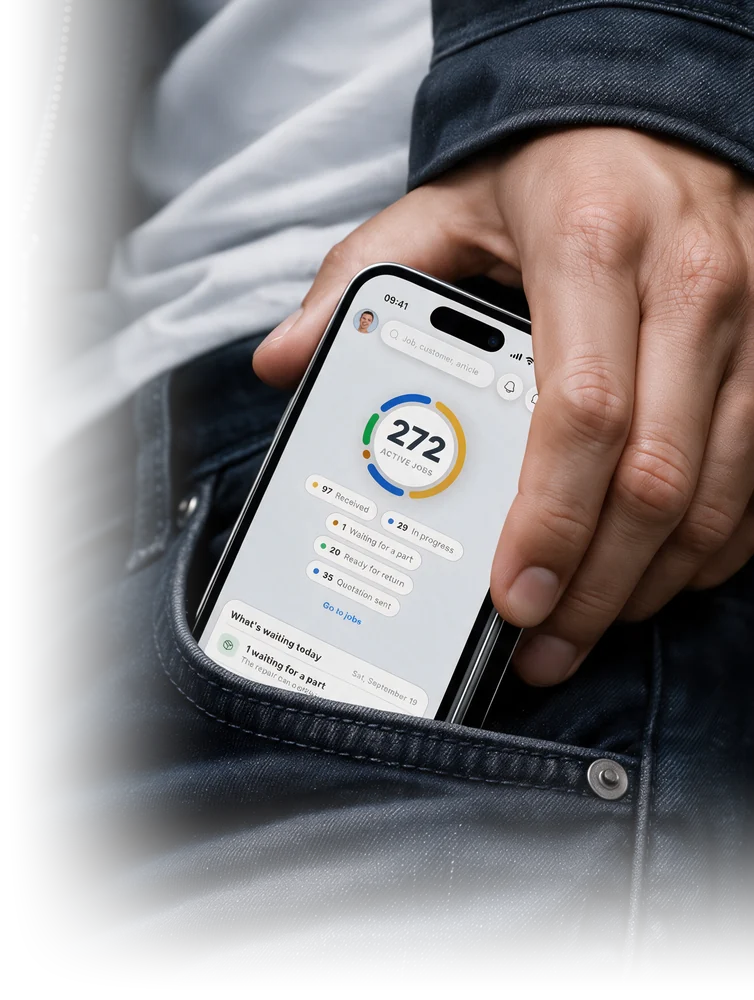
Your whole workshop in your pocket.
Take in repairs wherever you are, instead of on paper slips. Print the job sheet, your customer follows the status through a link. One app for iPhone and Android, for you and your team.
On Android, you sign up right in the app. On iPhone, you sign in to the app. Before that, you create your account on the web.
5.0 from 6 reviews on GetApp, Software Advice and Capterra
Who it's for
For every workshop that repairs.
Smartphone, coffee machine, e-bike, watch or industrial electronics. The RepairCMS App is built for every workshop and service center that takes in devices, repairs them and hands them back.

Smartphones

Coffee machines

Bike and e-bike

Watchmakers

Computers

Sewing machines

TV and audio

Drones

Electronics

Components

Industrial electronics

Intake
Job taken in, customer has signed.
Device, fault and customer in nine steps, under a minute. Your customer signs right on the phone, and the signature goes on the job sheet.
Scan the serial number
Models are suggested
Tracking link for your customer
Invoices
Invoice on your phone. Tap, finish, done.
Frequent line items sit at the top, new ones come in as product, service, free text or by scan. Net or gross, preview before you finish. Your customer pays by payment link or transfer QR code. Invoicing from Starter.
Frequent items with one tap
Add items by scan
Payment link and transfer QR

Scan
Scan the label, photos land in the job.
Point the camera at the device label, take the photo, done. The picture is attached to the right job straight away. No searching, no typing, no cable. Photos on the job from Business.
Label, barcode, QR
Photos right on the job
From the gallery too

Printouts
Print the label, hand over the job sheet.
Straight from the job, the RepairCMS App prints the device label on the Brother printer and the job sheet with signature for your customer. Quotes from Business, invoices with payment link from Starter.
Label via Brother printer
Job sheet with signature
Service report on the job

Communication
Customer, quote, team. One chat on the job.
The quote goes straight into the chat, your customer approves and pays in the tracking portal. Internal notes are seen by the team only. Customer messaging from Business, team messages from Team.
Email and chat in one
Quote in the chat
Notes for the team only


Stocktaking
Stocktaking on your phone. Scan, count, done.
Scan an item or a storage location, enter the stock or confirm it with one tap. Target and actual sit side by side, every difference stands out at once. No extra scanner, your phone is enough. Inventory from Team.
Target and actual per item
Differences visible at once
Stocktake report on record
Handover
Hand over the device, signature on the screen.
Your customer confirms the pickup with a signature right on the phone. The signature is attached to the job, and the job is closed. No paper, no arguments afterwards.
Signature on the screen
Attached to the job
Job closed


Lexware Office

seven.io SMS

Ultimate FastPAY

Purchasing Hub

EPC QR code

E-invoice

Apps & add-ons
Switch it on when you need it.
Lexware Office, e-invoice, transfer QR, FastPAY and SMS come with every plan. Each FastPAY payment costs the Stripe fee plus €0.25, and SMS runs through your own seven.io account. The Purchasing Hub is a paid add-on from Business.
Lexware Office accounting
E-invoice to ZUGFeRD
Transfer QR on the invoice
FastPAY payment link
SMS to customers
Purchasing Hub, add-on from Business
Getting started
Try it for 14 days, then pick your plan.
Everyone starts the same way, with 14 days free on the Team plan. Then you choose the plan that fits you and your team.
What the trial includes
14 days free
Everything in the Team plan
Print job sheets, service reports and labels
Signature at intake and handover
Scan serial number and IMEI with the camera
Invoices with e-invoice and transfer QR
Quotes for online approval and customer chat
Photos on the job
Stock and stocktaking on your phone
Assign jobs within your team
Repair Tracking for your customers
After that, plans start at Starter.
Ends on its own
What each plan includes
Unlimited jobs, the app and the desktop version on your computer
from Starter
Invoices with e-invoice (ZUGFeRD), Ultimate FastPAY and transfer QR
from Starter
Apps like Lexware Office and SMS to customers
from Starter
Quotes for online approval, customer chat, photos on the job, two users
from Business
Third user, job assignment, stock and stocktaking, self check-in, tracking without the RepairCMS logo
from Team
DHL shipping labels on the desktop (Repair Logistics) and Purchasing Hub
add-on from Business
B2B Partner Portal
add-on from Team
Starter costs €29 net per month billed annually, or about €32 net billed monthly. Add-ons cost extra.
See all plans →Customer reviews
What workshops using it say.


Game changer for repair management
“Everything runs automatically and you save at least one member of staff. Through the quote function, customers confirm or decline via link. In use for over 5 years.”
For managing watch repairs
“Specialized for watchmakers, clear time savings on quotes and communication, straightforward setup.”
For the phone repair business
“Top quality and first-class service. Repair jobs, inventory and sales managed seamlessly, with competent support.”
Start on Android
Take in your first job today.
You sign up right in the app and get started straight away. Your trial runs for 14 days, then you choose your plan.
On iPhone
You create your account on the web. Then you sign in to the iPhone app with the same login. If your business invited you, sign in with the invite.
Create your account on the web