


Invoicing Software for Repair Services

More cash flow, less waiting
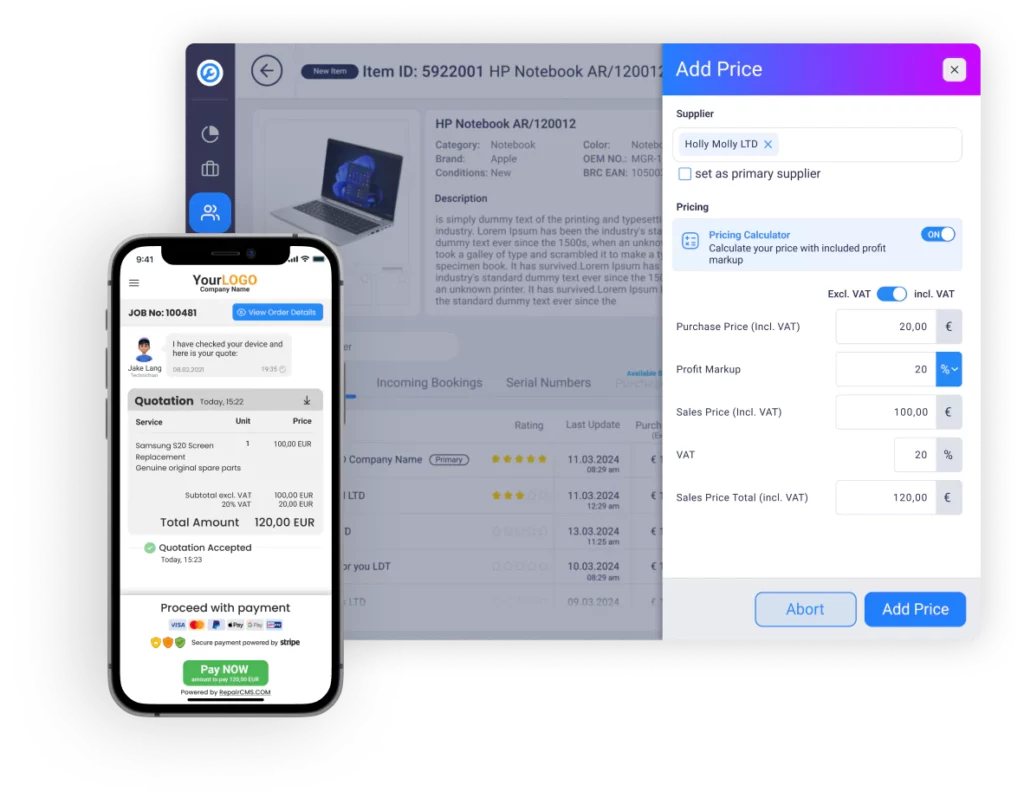
You improve cash flow by invoicing as early as the quoting stage and letting customers pay online right away. Money arrives while the job is still on the bench instead of weeks after pickup.
Turn repair tickets into smart invoices
In RepairCMS you build the invoice inside the repair ticket. Open the Invoice tab, pick the payment method and payment terms, check the preview and finalize. Line items from the quote and service report flow in automatically and stay editable until you finalize, so billing is fast and accurate without typing anything twice.
Invoices that reflect your quality
Every RepairCMS invoice lists parts, labor and tax as clear line items, so your customer sees exactly what they are paying for. A clean, itemized document shows the standard of your work and justifies every charge without a single follow up call.
Save time with text snippets
Text snippets insert your frequently used phrases into invoices with one click. You bill faster and every document stays consistent and precise, no matter who on your team writes it.
Billing and cash payments for repair jobs
Create the invoice on the spot and print it on your thermal receipt printer. Walk-in customers pay cash and leave with a clean printed receipt, fast and error free.
(for countries without TSE fiscal rules)
Instant payments with Ultimate FastPAY
With Ultimate FastPAY, the Stripe integration built into RepairCMS, your customers settle invoices online the moment they receive them. Secure, fast and with no detour through bank transfers.
Try for freeRepair management with a built-in online payment gateway
RepairCMS combines smart invoicing with a built-in payment gateway, so billing and payment run in one continuous flow instead of two separate systems. That takes routine work off your team and keeps every job moving from repaired to paid.
Faster payments with Ultimate FastPAY
Your customer can pay online the moment they approve the quote. No waiting for bank transfers, no chasing payments by phone.
Strong business logic and fast app performance
RepairCMS responds fast and keeps daily invoicing work simple. The interface stays intuitive while the business logic handles the routine decisions for you.
Why smart invoicing matters for repair shops
Smart invoicing prevents billing errors, keeps your financial records in order and gives your customers a seamless payment experience. The result is first class repair service on the outside and a healthy cash flow on the inside.
Boost your cash flow
Ultimate FastPAY processes payments quickly through Stripe, so your customers can pay invoices the moment they arrive. Each transaction costs the Stripe fee plus 0.25 euro, with no base fee, and your cash flow stays steady.
Smart invoicing, centrally managed
RepairCMS manages your billing in one place, which keeps payments on time, minimizes errors and makes bookkeeping easier.
Track invoice status in real time
You see the status of every invoice live, from created to sent to paid. RepairCMS shows you at a glance what is paid, pending or overdue, so nothing slips through.
What our members say
5.0 on GetApp, Capterra and Software Advice.
Frequently asked questions about repair invoicing software
Quick answers, no fine print.
Streamline your invoicing today
Join our satisfied customers and run your repair business with RepairCMS Ultimate, from ticket to paid invoice.