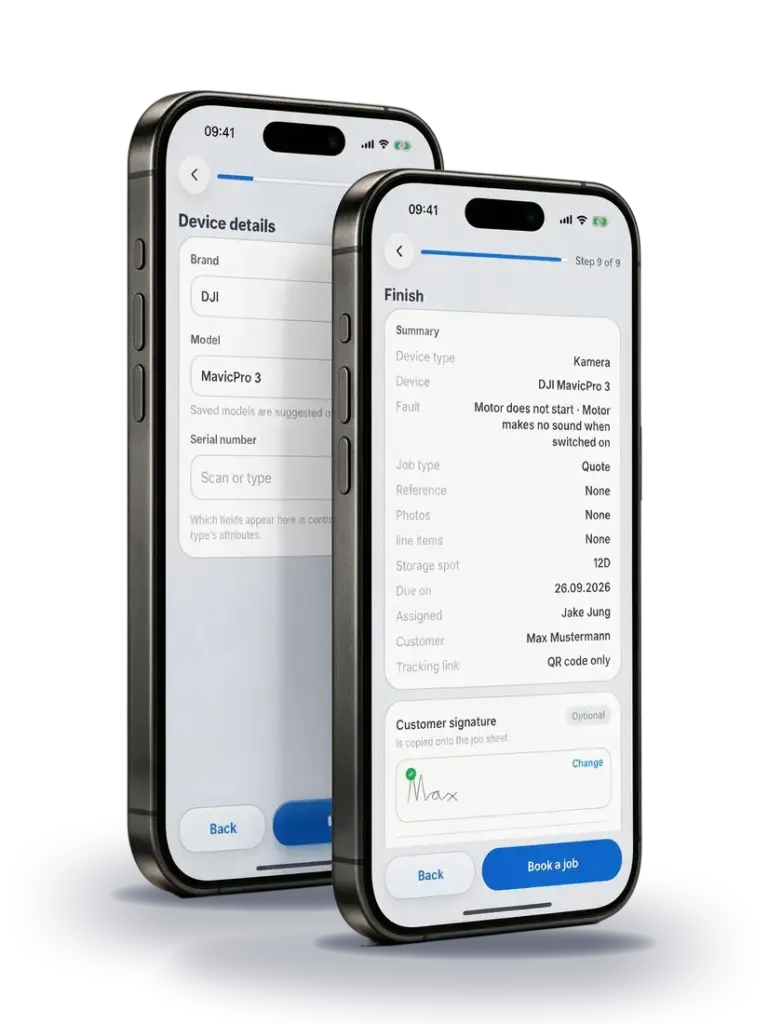
Online repair request form for workshops

Anyone who finds you can book the repair right away.

Put your repair request form on your website and share it on social media or by QR code. Your customer picks the repair, sees your price and describes the fault. The booking lands in RepairCMS as a service request with the details your customer entered. Your team reviews it and turns it into a job.

5.0 from 6 reviews GetApp logoGetApp Software Advice logoSoftware Advice Capterra logoCapterra

These businesses work with RepairCMS

KS Kaffee ACR Bielefeld EGN Forensic Batteriservice Danmark iExperts aksys IT-Systemhaus Dittrich Nähmaschinen Martin Elektrotechnik GmbH Beamer Reparatur Zentrum Spresso Kaffeemaschinen-Werkstatt PhoneExperts MCI Handyklinik Handyklinik Meppen

Live demo

Test the repair request form the way your customers see it.

Pick a booking method and an industry. Then try the sample form yourself, from the repair search to the finished request. The sample business, prices and data are made up, and nothing gets sent.

Your industry

Don't see your industry? Your real form shows your own services and prices from RepairCMS. You can also set it up for other types of repair.

Sample workshop demo, nothing gets sent

Mail-in repairs

Your customer books online and sends you the device with your DHL label.

With Repair Logistics, your customer gets a prepaid DHL return label by email. If RepairCMS creates the label right after booking, they can also show a QR code at DHL. The device comes to you, and the matching service request is already waiting in RepairCMS.

  1. Phone showing the form of the sample workshop fixservice with the selected display repair for €249

    Book the repair

    Your customer picks the repair and enters their details in the form.

  2. Prepaid DHL return label with sender, recipient and tracking number, example Phone showing the request confirmation with a button to download the DHL label and a QR code

    Get the label

    RepairCMS creates the label right after booking, or your team creates it later.

  3. Packed parcel with the DHL return label stuck on it

    Send the device

    Your customer drops the parcel off at DHL. The postage is billed through your DHL contract.

Repair Logistics is available as an add-on in the RepairCMS Team plan and included in the RepairCMS Enterprise plan. The form itself is included in the RepairCMS Team and Enterprise plans. You need a booking location in Germany and your own DHL contract. Outside Germany or without the add-on, you can provide a simple address label as a PDF, and your customer pays the postage.

One system

The booking doesn't end in your inbox. Your team keeps working on it.

Every online booking shows up as a service request in RepairCMS. Your team reviews it and turns it into a job. From there, it moves on through intake, device label, Repair Status and a documented handover.

MacBook showing the list of service requests in the RepairCMS Web App

RepairCMS Web App

Review the service request

Bookings from your website and from the tablet on site appear as service requests. You check the details and create the job in one step. You manage services and prices centrally in RepairCMS, and your changes also appear in your form.

In the browser, nothing to installChromeSafariEdgeFirefoxOpera

Brother label printer between two phones with the RepairCMS App: printing a device label and scanning the label

RepairCMS App iconRepairCMS App

Check in the device

Your team opens the job in the app on their phone and prints the device label straight to a supported Brother printer. Later, scanning the label takes them back to the job.

Phone showing the start screen of the Repair Status customer app

Icon of the Repair Status customer appRepair Status customer app

Keep customers up to date

Your customer opens Repair Status through a link or QR code. There they can follow the progress and, depending on the plan you booked, accept a quote. With Ultimate FastPAY, they can also pay online.

Phone with the RepairCMS App: the customer signs for the pickup on the screen

RepairCMS App iconRepairCMS App

Document the handover

At pickup, your customer signs on the screen. The signature is saved with the job.

RepairCMS App icon

RepairCMS App

For your team

Download the RepairCMS App on the App StoreGet the RepairCMS App on Google Play

Icon of the Repair Status customer app

Repair Status customer app

For your customers

Download the Repair Status customer app on the App StoreGet the Repair Status customer app on Google Play

Form types

The right repair request form for every way to book.

Set up as many forms as your business needs. Each form type takes your customers through the right steps. Requests from your website, tablet and RMA forms come together in your service requests, and bookings from your team become a job right away.

Repair Leads

Online booking

Your customer searches for the repair on your website, sees the price you set and books. You can also share the form by link or QR code.

Kiosk

On-site check-in

Your customer enters their details on the tablet. When they finish, the form is ready for the next customer.

Service Agent

Intake by your team

Your team records the repair together with the customer, offers add-on services and prints the receipts and labels you need.

RMA and warranty

Warranty claim form

Customers submit the serial number, proof of purchase, fault description and photos in one structured form. Your team reviews the claim like any other service request.

For manufacturers and service networks: Partners can also register their repairs through the B2B Partner Portal. For special RMA workflows, we offer custom Enterprise processes. You can find every step for building your own form in our help center for the Ultimate Repair Form Builder.

iPad on a stand showing the repair request form with a custom logo and an orange brand color

Your form

Your logo, your services, your questions.

The form fits your business. You choose the colors and font, plus the steps and their order. Ask for the details your team needs at intake, such as model, fault, photos or add-on services. For most fields, you decide whether they are required or optional.

  • Your own services and prices
  • No coding needed
  • Language choice for customers
Help: design and settings

We help you get started

We set up your form and put it on your website.

We set up the form with your services and prices and, if you like, build it into your website. The services below are one-off. You also need the Form Builder, which is included in the RepairCMS Team and Enterprise plans.

Form setup

€249 one-off, excl. VAT

For you if your website is already up and running.

  • Set up the form with your services and prices
  • Add your logo and colors
  • Build the form into your website
  • Check a test booking through to your service requests

After that, you manage your services and prices yourself in RepairCMS.

Offer for RepairCMS customers until 31 December 2026

One-pager with booking

€1,490 from €590 one-off, excl. VAT

For you if you don't have a website yet or want a new one.

  • One page with your logo and your services
  • Built-in booking form
  • Opening hours, contact details and a directions map
  • Subpages for legal notice and privacy policy with the legal text you provide

We agree on any extra pages, text or photos beforehand. You pay for the domain and hosting yourself.

Request setup

Tell us which website you have and what you'd like us to take care of. We'll then send you a proposal.

Customer reviews

What repair businesses say about RepairCMS.

These reviews are about RepairCMS as software for the whole repair process. Reviews translated from German.

GetApp, 5.0 from 6 reviews for RepairCMS Software Advice, 5.0 from 6 reviews for RepairCMS Capterra, 5.0 from 6 reviews for RepairCMS

“Gamechanger for repair management”

Everything runs automatically and you save at least one employee. Through the quoting feature, customers approve or decline via a link with a PDF. In use for over 5 years.
Halil E.Electronics Manufacturing · October 2024

Verified review on Software Advice

“Helpful repair software for workshops”

Better organization in the workshop, an intuitive interface, easy job creation and quote management. Feedback gets implemented quickly.
Torsten K.Computer Hardware · May 2026

Verified review on Software Advice

“For managing watch repairs”

Specialized in watchmakers, with clear time savings on quotes and communication, and an uncomplicated setup.
Robin I.Watches and Jewelry · October 2024

Verified review on Software Advice

“For the phone repair business”

Top quality and first class service. Repair jobs, inventory and sales managed seamlessly, with competent support.
Phonemaker K.Phone Repair · November 2024

Verified review on Software Advice

“Everything just fits”

Great, everything really fits. The print function in particular is super flexible.
Mahmoud M.IT Services · May 2025

Verified review on Software Advice

“My experience with RepairCMS”

Easy to use and helpful. Nothing to complain about, it is super simple and has only very minor bugs.
Eren K.Telecommunications · October 2024

Verified review on Software Advice

Data protection and operations

Where your customer data is stored and how RepairCMS runs.

All you need is a browser. No installation and no servers of your own.

Frankfurt

Where your data is stored

Your data is stored in a database in Frankfurt. The application runs on servers in the EU. It's the same in every plan.

GDPR

GDPR compliant

We process your data and your customers' data in line with the GDPR. What we process and why is set out in our privacy statement. You can see which service providers work with us in our list of subcontractors.

99.9%

Web App uptime

You can check how the Web App is running at any time on status.repaircms.com, in the “APP (ULTIMATE)” row.

Get started

Try the form or show us how you work.

Test RepairCMS free for 14 days. If you'd like to see first how online booking, DHL mail-in and job handling work together for your business, book a demo.

Try it free for 14 days. No payment details needed.

Frequently asked questions about the repair request form

Can I embed the repair request form on my website?

Yes. You can build it into your website and also share it by link or QR code. Bookings land in RepairCMS as service requests. If you like, we take care of the setup and embedding for you. If you'd rather do it yourself, our help center shows how to add the form to your website and how it works with WordPress and website builders.

Can my customer mail in a device with DHL?

Yes. With the Repair Logistics add-on, your customer gets a prepaid DHL return label by email. Labels created automatically also come with a QR code. For this, you need a booking location in Germany and your own DHL contract. You can see which credentials you need from your DHL Business Customer Portal in our help guide. Outside Germany or without the add-on, you can provide a simple address label as a PDF, and your customer pays the postage. The terms of your DHL contract apply to shipping, including insurance.

What should a repair request form ask for?

It should ask for what your team needs at intake: the device's brand and model, the fault, your customer's contact details and address, plus consent to your terms and privacy policy. In the Form Builder, each new form starts from the repair form template for its form type, with these steps and a few more, such as device security, and you add or remove steps as you need. You can read how to organize intake after that in our article on the repair intake process. If you still take repairs in on paper, download our free repair order template.

Does the repair request form work for bikes, watches or coffee machines?

Yes. The form shows your services and prices from RepairCMS. The examples in the live demo cover different industries, and you set up your own form for your business.

Is there a template for an RMA form?

Yes. RMA and warranty is a form type of its own, so your RMA form template is ready in the Form Builder. You add your logo, and customers fill in the warranty claim form themselves with device details, serial number, proof of purchase and photos. Your team reviews the claim in RepairCMS.

How much does the Ultimate Repair Form Builder cost?

The Form Builder is included in the RepairCMS Team and Enterprise plans. Repair Logistics is available as an add-on in the RepairCMS Team plan and included in the RepairCMS Enterprise plan. The optional setup service is charged separately. You can find current plan and add-on prices on our pricing page.

Sample workshop demo, nothing gets sent