





Free template
Repair order template: free to download as PDF or Word.
One page for every device you take in, from customer details to the signature.
No sign-up and no email address needed. Printing on US Letter? Get the Letter PDF.
What goes on a repair order?
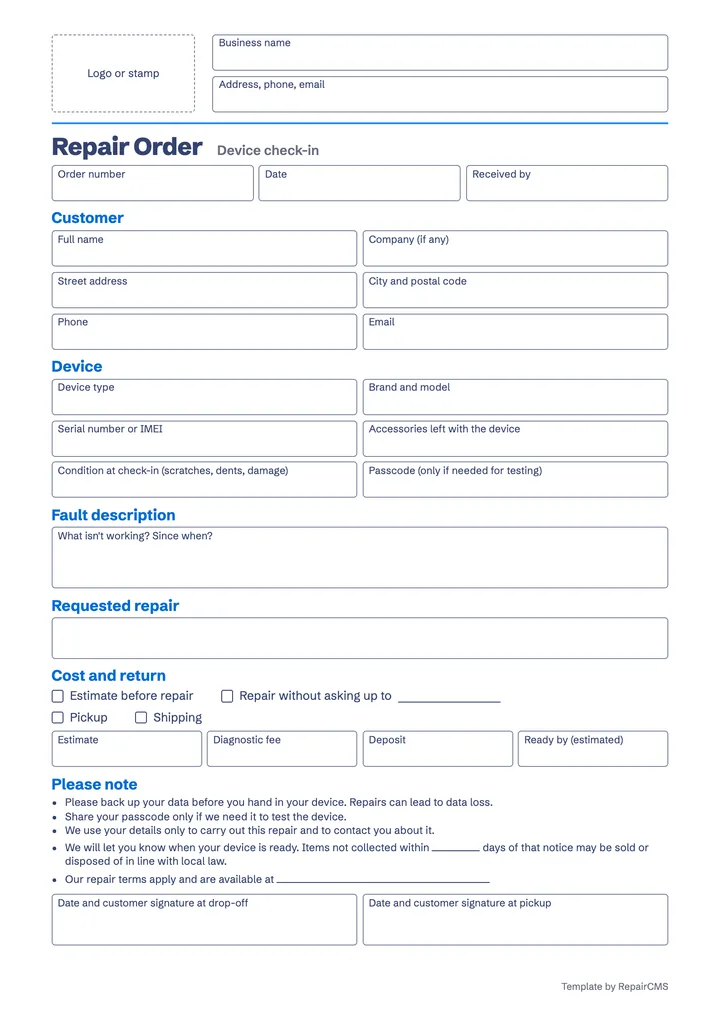
A repair order records the customer, the device, the fault, the agreed work, the costs, pickup or shipping and the signatures. With these details, everyone on your team knows who owns the device and what your customer asked for.
| Field in the template | Why it matters |
|---|---|
| Customer | With a phone number and email address, you can reach your customer when you have a question and when the device is ready. |
| Device | Device type, brand and model tell you which spare parts you need. |
| Serial number or IMEI | It identifies the device, even when several of the same model sit on the shelf. For an e-bike, enter the frame number here. |
| Accessories | Charger, case or battery go on the sheet. At pickup, you see at a glance what goes back to the customer. |
| Condition | Scratches and dents are written down before the repair starts. If a question comes up later, the sheet shows whether the damage was already there. |
| Passcode | Some tests only work on an unlocked device. Write the code down only when you need it for that. |
| Fault description | “What isn't working?” and “Since when?” give your technician a first lead before opening the device. |
| Requested repair | This is what your customer asks you to do, for example replace the battery or check the device first. |
| Estimate | You tick whether your customer gets an estimate first or up to which amount you may repair without asking. Add your diagnostic fee next to it. That settles the price range before any work begins. |
| Deposit | The amount is on the order, so at pickup you both know what is still due. |
| Pickup or shipping | Pickup or shipping and the “Ready by” date tell your customer when and how the device comes back. |
| Please note | Sample wording on data backup, your passcode, privacy, devices nobody collects and your repair terms is ready to use. Check it and adapt it to your business and your local law. |
| Two signatures | Your customer signs once at drop-off and once at pickup, both on the same sheet. |
Every field is ready in the template.
Which intake mistakes cost you time later?
Any detail you miss at intake costs you time later, because it turns into a phone call or an argument. These six gaps are easy to close.
Nobody wrote down the condition
If a customer spots a scratch at pickup and nothing was noted, it's your word against theirs. Go through the device together and write down every mark you find.
The fault description is too short
“It's broken” gives your technician little to go on. Ask what exactly happens and since when, for example “Since Monday, the coffee only drips out.”
Nobody agreed on a cost limit
If the diagnosis finds more than expected, you have to reach your customer before you can carry on. So agree at intake whether an estimate comes first or up to which amount you may keep repairing. For the estimate itself, use our free repair estimate template.
The device has no number
A device without a number costs you time searching the shelf. Write the order number on the sheet and on a label for the device. Keep the original with the device. Your customer gets the copy.
The passcode is lying around
A passcode opens private data. Ask for it only when you need it for testing, and keep the device and the sheet where only your team can reach them.
Pickup was never agreed
Without an agreed way back, finished devices stay on the shelf. Tick pickup or shipping and write down when the device should be ready. Our template has a sample line for devices that nobody collects. Fill in the number of days and check it against the rules in your country or state. You can see a complete intake from first contact to a documented job in our article on the repair intake process.
When does a paper repair order reach its limits?
Paper reaches its limits as soon as several people need the same order or customers want to book a repair outside your opening hours. When a customer calls about their repair, you first walk to the shelf or to the technician. For the invoice, you type the details in again, and the sheet has no room for photos of the condition. As long as you take in a few devices, the template does the job well.
How does the RepairCMS repair request form work?
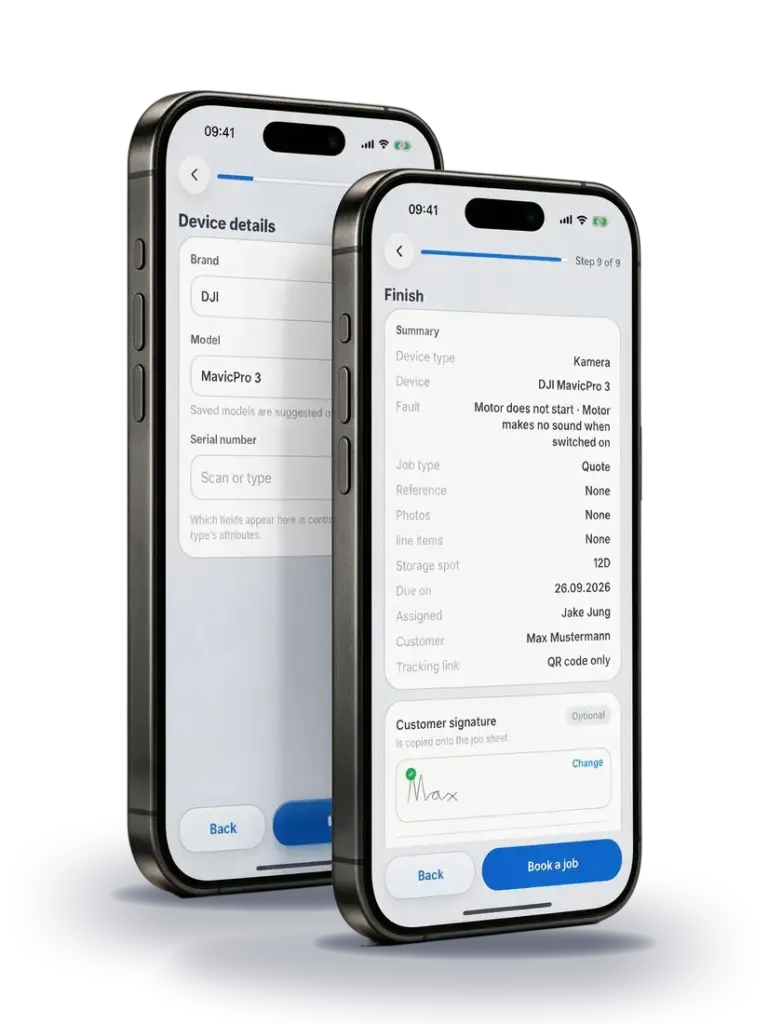
With the Ultimate Repair Form Builder from RepairCMS, your customer enters the device, the fault, their contact details and a signature themselves, on your website or on a tablet on site. The request lands straight in RepairCMS, where your team reviews it and turns it into a job. Your customer follows the repair in the customer portal, and RepairCMS carries the items from the quote and the service report over into the invoice. The form carries your logo and colors, and you decide which steps it shows.
If the sheet is all you need, stick with it. If you'd like to see how your customer fills in the form, try the repair request form yourself.
Frequently asked questions about the repair order template
Is the repair order template really free?
Yes. You download it as PDF or Word without signing up and without an email address. Use and copy it in your business as often as you like.
Can I fill in the template on my computer?
Yes, with the Word version. Enter your business details there and replace the “Logo or stamp” box with your logo. The PDF version is meant for printing, and you add your business name and stamp by hand. In both cases, print page 1 and copy it once it's filled in. Your customer gets the copy, and the original stays with the device. The PDF also comes in US Letter format.
What is the difference between a repair order, a work order and a job sheet?
Most of the time, all three mean the same sheet. Repair order is the usual word when a customer hands in a device, work order is common in maintenance and field service, and job sheet is what many workshops in the UK call it. Our template covers all three, and the copy you hand your customer serves as their drop-off receipt.
Does the template protect me legally?
The template gives your intake a fixed structure. The notes in it are sample wording, not legal advice. Check them for your business, your country and your state, and add your own repair terms.
Which industries does the template suit?
The template works across trades: smartphones, computers and other electronics, bikes and e-bikes, watches, coffee machines and sewing machines. If your business needs other details, rename the fields in the Word version. You can read more about each trade on our page about repair software for your industry.
How much does the RepairCMS repair request form cost?
The Ultimate Repair Form Builder is included in the RepairCMS Team and Enterprise plans at no extra cost. You can try RepairCMS free for 14 days with everything in the Team plan, and no payment details are needed. You can compare all plans and prices on our pricing page.
Try the RepairCMS repair request form free for 14 days.
Set up your own form and follow the path from request to invoice. No payment details needed.
