





For repair shops, service centers and manufacturers
Repair shop software that shows you where every repair stands.
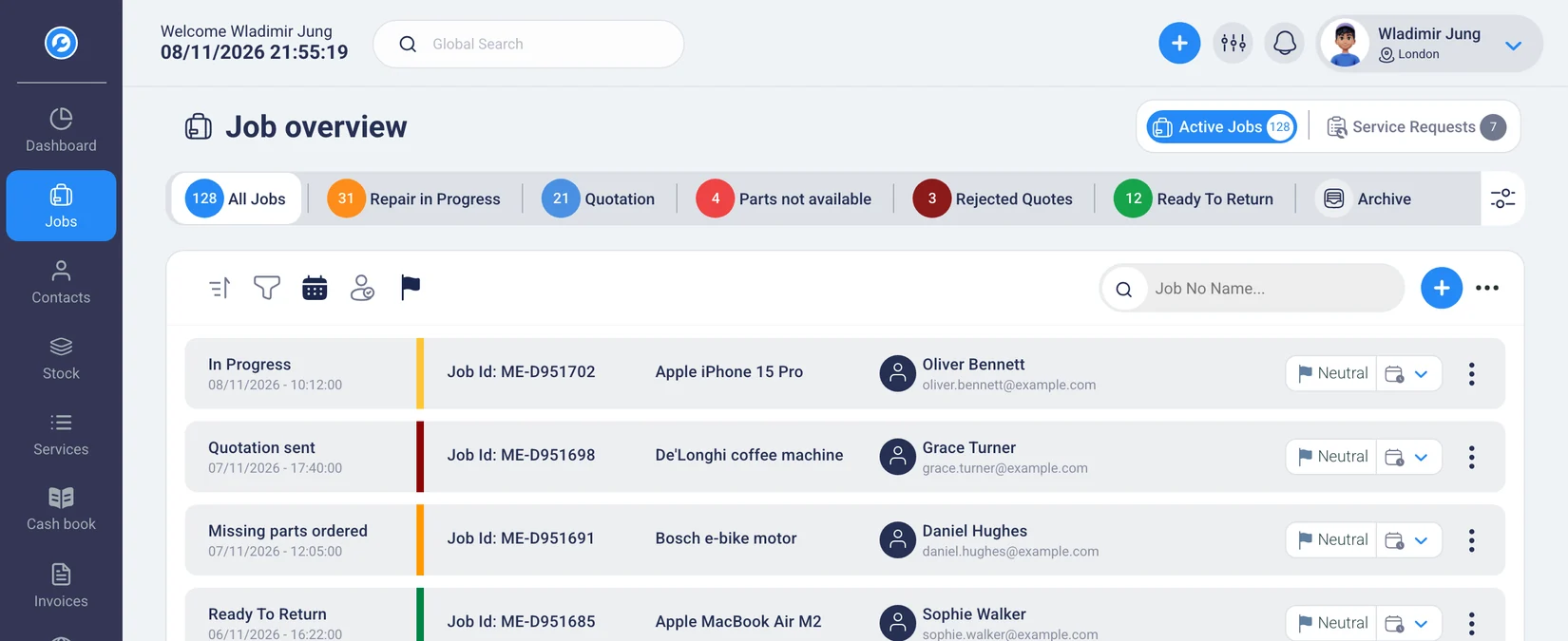
Who has which device? What's waiting on a spare part? Which repair is ready? RepairCMS shows your team where every job stands, and your customers track their repair in the customer portal.
No payment details needed · Plans from €29 a month excl. VAT, billed annually
5.0 out of 5 stars from 6 reviews on Software Advice
Also listed on  GetApp and
 Capterra
These businesses work with RepairCMS












When only one person knows the status, the rest of your workshop stands still.
A customer asks about their device. Someone tracks down the job, checks with the technician and pieces the answer together from notes and messages. Meanwhile, the next customer is waiting.
Status questions interrupt your work.
Even a simple answer means tracking down the job or the person working on it first.
Information lives in different places.
Diagnosis, photos and messages end up on paper slips, in inboxes and in chats.
Writing a quote means doing the work twice.
What the technician has already documented gets typed up again later.
Your team has no shared view.
Who takes the next step? Without an up-to-date job overview, someone has to ask.
In RepairCMS, this information stays right on the job, visible to your team and, where it makes sense, to your customer.
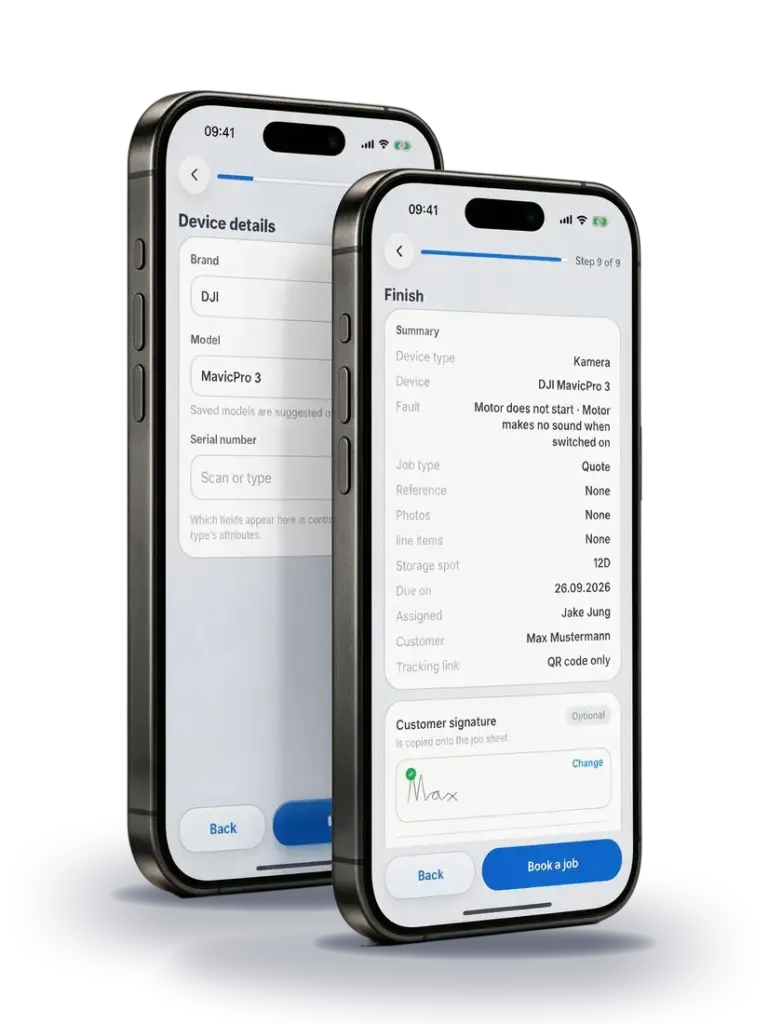
1Intake
Check the device in. The key details stay with the job.
Record the customer, device, fault and serial number right at intake. Accessories and condition go in the same place. Your customer signs on the screen, and then you can print the job sheet and device label. If the device comes back, you'll find its earlier jobs by serial number.
Job photos and service labels are included in the RepairCMS Business, Team and Enterprise plans.
Requests from your online repair booking land in RepairCMS as service requests first. Once you've reviewed one, you turn it into a job. Online repair booking and the repair request form for your website are included in the RepairCMS Team and Enterprise plans.
Guide in the Help Center: How to book a repair ticket · Service requests and check-in

2Status
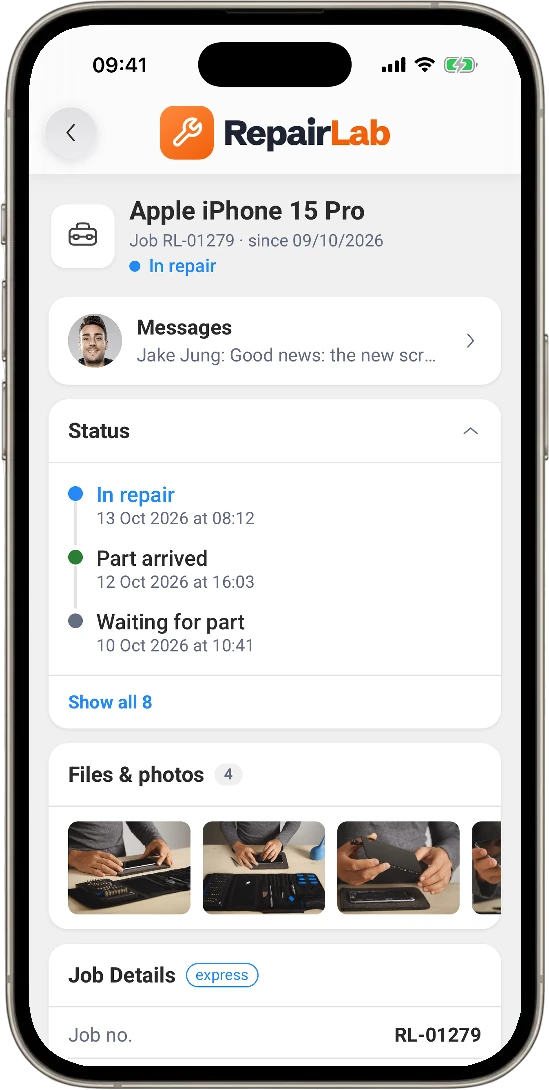
Your customers check their repair status on their own.
After intake, your customer gets access to the customer portal. There they can see the current status and send you a message. That way, the portal answers a lot of status questions before the phone even rings.
Customer portal messaging is included in the RepairCMS Business, Team and Enterprise plans.
RepairCMS can email your customer when the status changes. You can also send SMS through your own seven.io account with our SMS integration shows.
3Quote
Turn the diagnosis into a quote without typing it again.
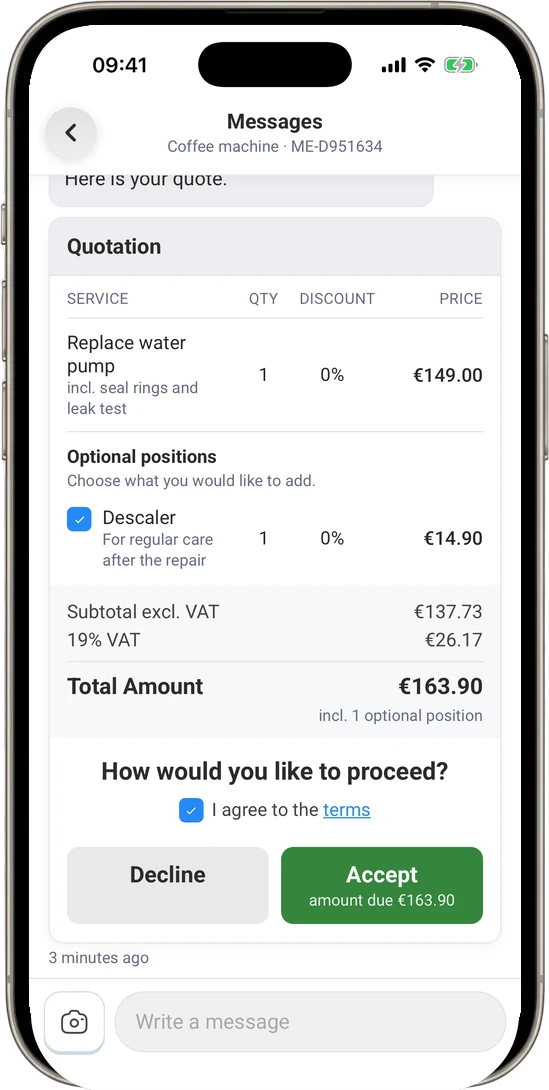
The technician records the diagnosis and the work needed in the service report. RepairCMS pulls those lines into the quote. Your customer reviews it in the portal, picks optional items and approves or declines the repair online. The decision shows up right on the job.
Quotes and online approval are included in the RepairCMS Business, Team and Enterprise plans.
Guide in the Help Center: Review and approve repair quotes online

4Spare parts
See which spare parts each job needs.
The spare parts a repair needs are listed in the service report and carry over into the quote and invoice. RepairCMS shows your stock levels and alerts you when an item drops below its minimum stock level. That way, your team knows early on which spare parts a repair is still missing. Learn more about our inventory management.
Item and inventory management is included in the RepairCMS Team and Enterprise plans. The Purchasing Hub for bundled orders is a separate add-on.
Guide in the Help Center: Create and edit service reports
5Invoice
Create the invoice from the finished job.
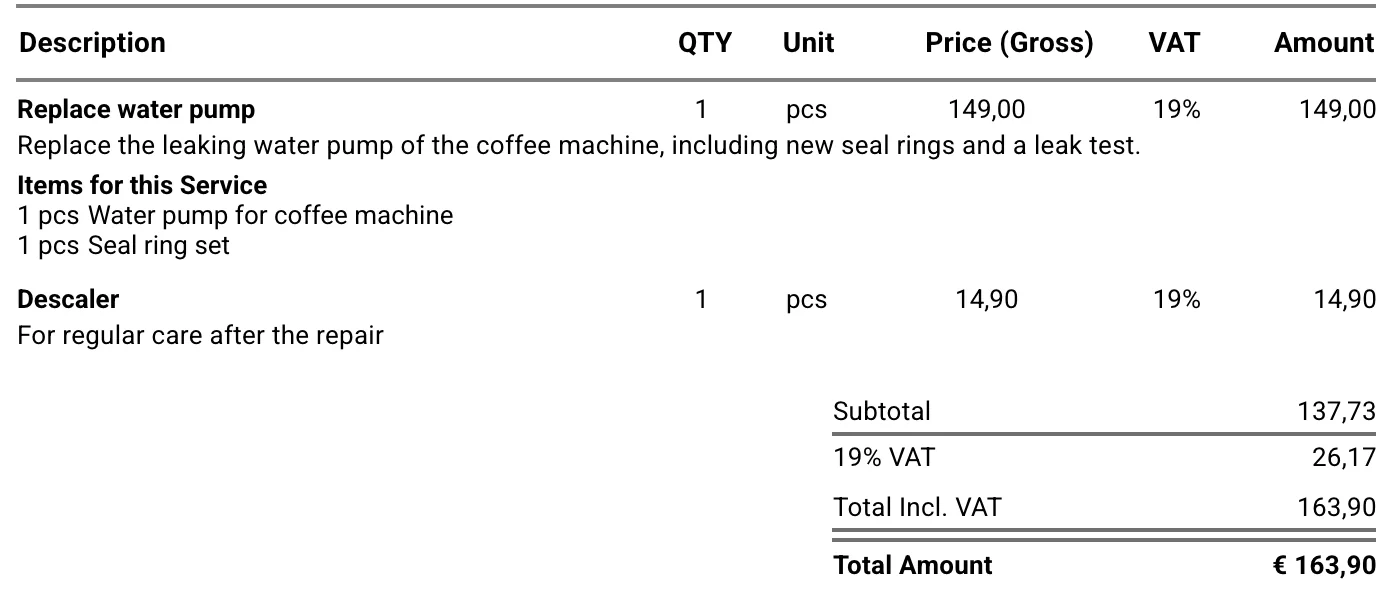
RepairCMS carries the services and spare parts over from the job, so you don't have to gather them again. Before you finalize the invoice, you can review and adjust them. For businesses in Germany, you can create the invoice as a ZUGFeRD e-invoice and send it to Lexware Office. Learn more about our repair invoicing software.
For online payments with Ultimate FastPAY, you connect your own Stripe account. At pickup, your customer can confirm on screen that they've received their device.
Guide in the Help Center: Create invoices from repair orders
Invoice

Try the workflow with a real job.


6Team
Everyone sees what needs doing today.
The overview shows open jobs by status, urgent cases and new service requests. Assign a job to someone so everyone knows who handles the next step. You set permissions for each role, from viewing revenue to talking with customers.
Assigning jobs within your team is included in the RepairCMS Team and Enterprise plans.
Guide in the Help Center: Manage user permissions
How repair businesses work with RepairCMS.
These reviews cover RepairCMS across the whole repair workflow.
“Gamechanger for repair management”
Everything runs automatically and you save at least one employee. Through the quoting feature, customers approve or decline via a link with a PDF. In use for over 5 years.
Verified review on Software Advice
“Helpful repair software for workshops”
Better organization in the workshop, an intuitive interface, easy job creation and quote management. Feedback gets implemented quickly.
Verified review on Software Advice
“For managing watch repairs”
Specialized in watchmakers, with clear time savings on quotes and communication, and an uncomplicated setup.
Verified review on Software Advice
Your job data is stored in Frankfurt.
The database for your jobs is in Frankfurt, Germany, and the application runs on servers in the EU. Our support team answers in English and German.
Germany
Database in Germany
Your job data is stored in a database in Frankfurt.
GDPR
See how your data is handled
To see how RepairCMS processes data and which service providers are involved, read our privacy statement and list of subcontractors.
Status
Check the system status
You can check the current status of the Web App at any time on status.repaircms.com.
Try RepairCMS with a single job first.
Create your account
Start your 14-day free trial, no payment details needed.
Record your first job
Pick a device from your daily work and take it through the workflow from intake to completion.
Add your team and data
If the workflow fits, invite your team and import customer lists, items or price lists as needed.
If you're switching from other software, the RepairCMS team can help you transfer your data for a one-time fee.
Frequently asked questions about repair shop software
What kind of business is RepairCMS for?
RepairCMS is repair shop software made for businesses that repair devices, such as repair shops, service centers and manufacturers with their own service department. Whether you fix smartphones, computers, watches, bikes, coffee machines or other devices, everything starts from the repair job. For car repair shops, a specialized solution is usually a better fit.
We use Excel or paper today. How hard is it to get started?
You can start with one new job and test the workflow while your business runs as usual. A setup assistant sets up the most important areas for you. You can import customer lists, items and price lists later via CSV or Excel.
Can I bring my existing data over?
You can import customer lists, items and price lists yourself via CSV or Excel. If you're switching from other software, RepairCMS can help with the data transfer on request, as a one-time paid service. It's best to talk with us first about which data can be transferred.
How much does RepairCMS cost?
Starter costs €29 a month excl. VAT, billed annually. Business costs €69, Team €99 and Enterprise starts at €299 a month excl. VAT, also billed annually. Quotes are included in the Business, Team and Enterprise plans. Inventory management and job assignment are included in the Team and Enterprise plans. You'll find all features and prices on the pricing page.
What can my customer do in the portal?
Your customer can follow the repair status. In the RepairCMS Business, Team and Enterprise plans, they can also message you and review, approve or decline a quote online.
Can my team work in RepairCMS?
Yes. Starter includes one user, Business two and Team three. In the Team and Enterprise plans, you can assign jobs to people and set their permissions. You can add more users. You'll find the current terms on the pricing page.
Do I need extra accounts for SMS or online payments?
Yes. You send SMS through your own seven.io account. For online payments with Ultimate FastPAY, you connect your own Stripe account. Both providers charge their fees separately.
Try RepairCMS with the next device that comes in.
Create a job, track its status and see if the workflow fits your business. You have 14 days and don't need payment details to start.
