




Bike repair shop software
Know where every bike is, from check-in to pickup.
Check in bikes, e-bikes and e-scooters with condition, accessories and serial number. RepairCMS keeps the diagnosis, next step and invoice on the same work order. Your team sees where each repair stands, and your customers follow it themselves.
No payment details needed.
5.0 out of 5 stars from 6 reviews on Software Advice
When a customer asks about their bike, the answer should be on the work order.
Has the spare part arrived?
Is the e-bike still waiting for approval?
Can the bike be picked up?
Questions like these eat up time when the answers sit on paper notes, in text messages or in someone's head.
Every detail stays with the bike
Serial number, accessories, condition and diagnosis stay on the work order.
One status for the whole workshop
Your team sees what is being worked on and which step comes next.
Fewer calls about the status
Customers follow the progress in the customer portal instead of calling to ask where their bike is.
RepairCMS connects these steps in one workflow, from check-in to handover.
How a bike repair works
One work order. Four steps. One shared status.
RepairCMS follows the repair from start to finish, so your team works from the same details at every step instead of gathering them again.
Step 1
Check in the bike
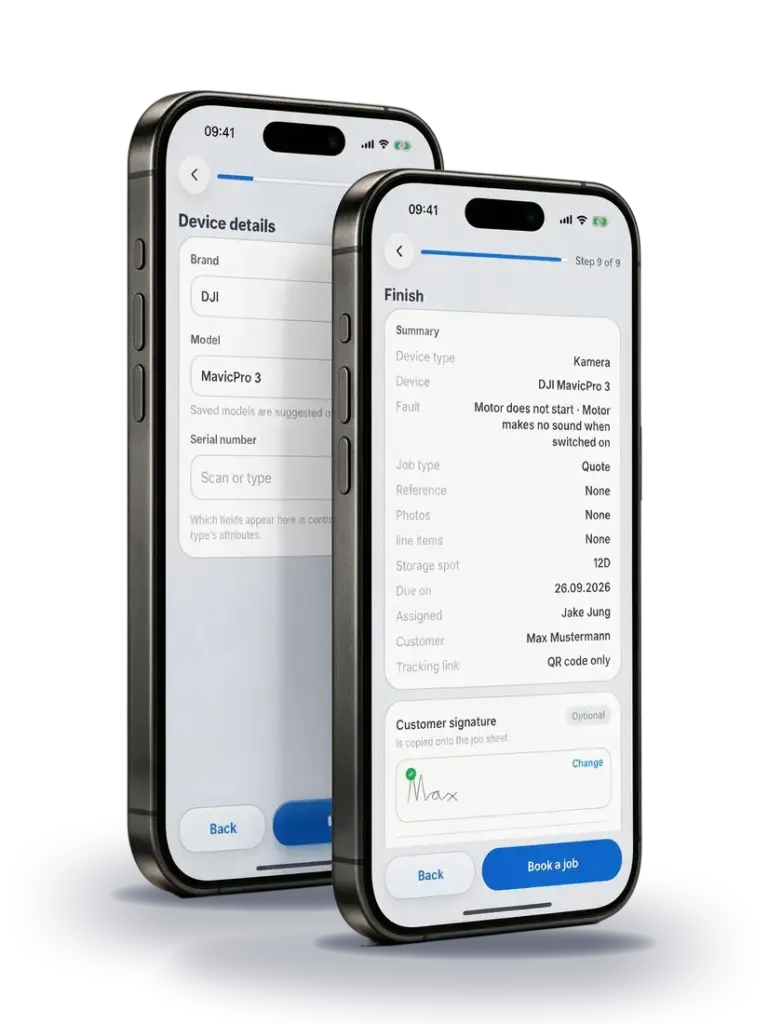
Record the bike, e-bike or e-scooter with brand, model, serial number, accessories and condition. Note the fault and let your customer sign for the check-in on the screen.
Optional: repair tag
If you like, print a repair tag with the work order number and storage location and attach it to the bike. That way your team can match every bike in the workshop to its work order. Our help center shows how to set up and print repair tags.


Step 2
Record the diagnosis and get approval
Your team records the diagnosis, the work to be done and the spare parts needed in the service report. When a quote is needed, your customer reviews and approves it online.

Step 3
Repair the bike and show the status
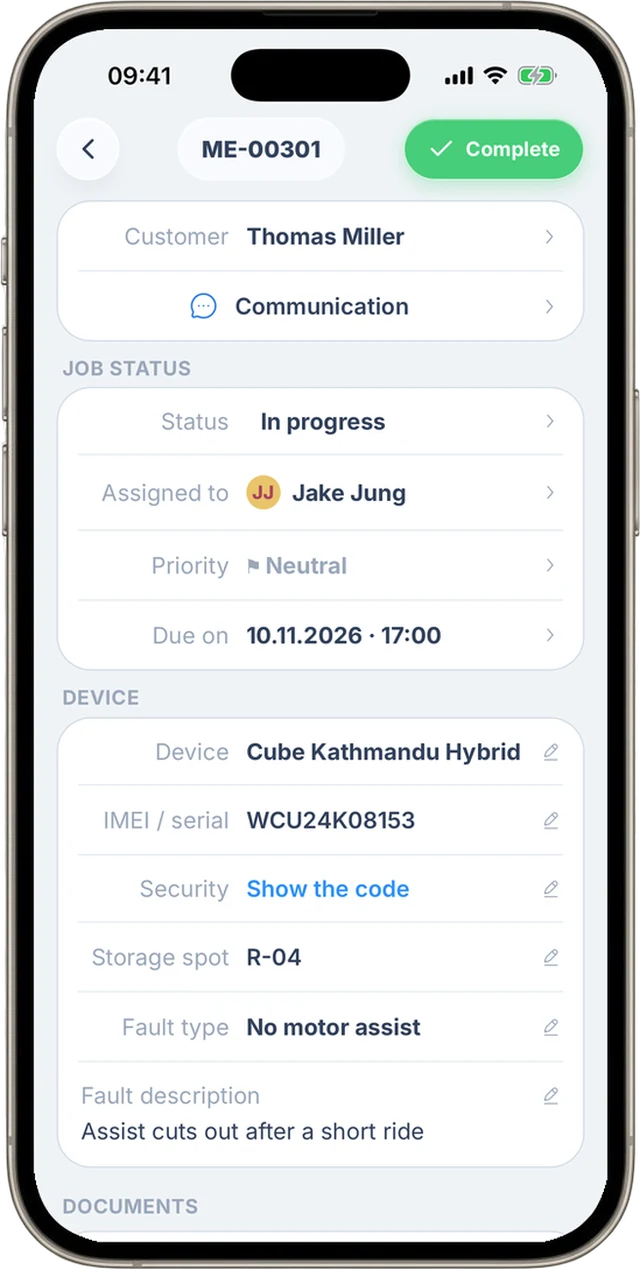
The work order shows where the repair stands. Your customer follows the status in the customer portal or in the customer app.

Step 4
Create the invoice and hand over the bike
Line items from the service report and the quote carry over to the invoice. You check them, create the invoice and record the handover with a signature.
See how it works with one of your own work orders.

Find the right bike, even when it comes back.
Set up bikes, e-bikes and e-scooters as their own device categories. At check-in you record what your team needs later: brand, model, serial number, the accessories that came with it, and its condition. When the same bike comes back to the workshop, you find its earlier repairs by serial number.
Example
An e-bike comes in for diagnosis.
At check-in you note the charger it came with and any visible damage. Later your team adds the diagnosis to the same work order. So when a question comes up, nobody has to piece together what was dropped off or what has already been checked.

Your customer sees for themselves when their bike is ready.
After check-in, your customer gets a link to the repair status. In the customer portal they see the current status and the history. On their phone they can use our customer app, Repair Status by RepairCMS. When the bike is ready, they see the new status, and you can also let them know by email. Here is what your customers see in Repair Status by RepairCMS.
More about the customer portal and repair status →
Repair Status by RepairCMS
For your customers, on iPhone and Android



Let customers request their bike repair online.
With the RepairCMS repair request form, customers describe what's wrong with their bike on your website, through a link or with a QR code. They see the services and prices you offer. The request lands in RepairCMS, and your team reviews it and turns it into a work order. If the check turns up more work, you can send a quote before you start.
See the bike demo of the form → More about the repair request form
The work order goes where the bike is.
With the RepairCMS app you work at the bike, not just at the desk. You can check in a bike, scan the serial number, open the work order, change the status and have your customer sign for the handover on the screen. The web app and the app on your phone share the same work orders.
- Record the bike and customer details at check-in
- Scan the serial number with the camera
- Open work orders and change the status on the go
- Get signatures for check-in and handover

RepairCMS App
For your team, on iPhone and Android
Built for repair work orders.
RepairCMS runs your repairs from the moment a bike comes in to the invoice. If you also sell new bikes and a wide range of products, your retail system stays in charge of those sales. You can manage the spare parts inventory for your repairs in RepairCMS.
More about inventory for repairs →What repair businesses say about RepairCMS.
These reviews come from different repair businesses and are about RepairCMS in general.
“Helpful repair software for workshops”
Better organization in the workshop, an intuitive interface, easy job creation and quote management. Feedback gets implemented quickly.
Verified review on Software Advice“My experience with RepairCMS”
Easy to use and helpful. Nothing to complain about, it is super simple and has only very minor bugs.
Verified review on Software Advice“For managing watch repairs”
Specialized in watchmakers, with clear time savings on quotes and communication, and an uncomplicated setup.
Verified review on Software AdviceFrequently asked questions about bike repair shop software
Does RepairCMS work for e-bikes and e-scooters?
Yes. You can set up bikes, e-bikes and e-scooters as their own device categories and record brand, model, serial number, accessories and condition at check-in.
Can my customer see how far along the repair is?
Yes. With the link from the work order confirmation, your customer sees the repair status and the history in the customer portal. On their phone, they can also use the customer app for this.
Can customers request a repair online?
Yes. Customers fill in the repair request form on your website, through a link or with a QR code. The request lands in RepairCMS. Your team reviews it and turns it into a work order. The form is included in the RepairCMS Team and Enterprise plans.
Can I manage spare parts for repairs?
Yes. RepairCMS has a spare parts inventory for repair work orders. Inventory management is included in the RepairCMS Team and Enterprise plans. For selling new bikes and the rest of your range, your retail system stays in charge.
How much does RepairCMS cost?
RepairCMS starts with the Starter plan at €29 a month excl. VAT, billed annually. The current pricing overview shows which features each plan includes. You can try the software free for 14 days first, with no payment details needed.
Can I use RepairCMS on a computer and on my phone?
Yes. You work on the same work orders in the browser and in the RepairCMS app for iPhone and Android. The app is included in every paid plan.
How do I try the software in my workshop?
In the free trial, start by setting up a category for bikes or e-bikes. Then check in a real bike and take its work order all the way to pickup. That way you see in your own workflow whether RepairCMS fits your workshop.
Try RepairCMS on the next bike that comes in.
Create a work order for a real bike and see whether check-in, status and handover fit the way your workshop runs. You can try RepairCMS free for 14 days, with no payment details needed.
